

AI agents in LoopChat
An AI agent answers WhatsApp messages using AI instead of a fixed path. A bot follows the steps you drew; an agent reads the message, checks the knowledge you gave it, and writes a reply. It can also take actions, such as assigning or resolving the chat.
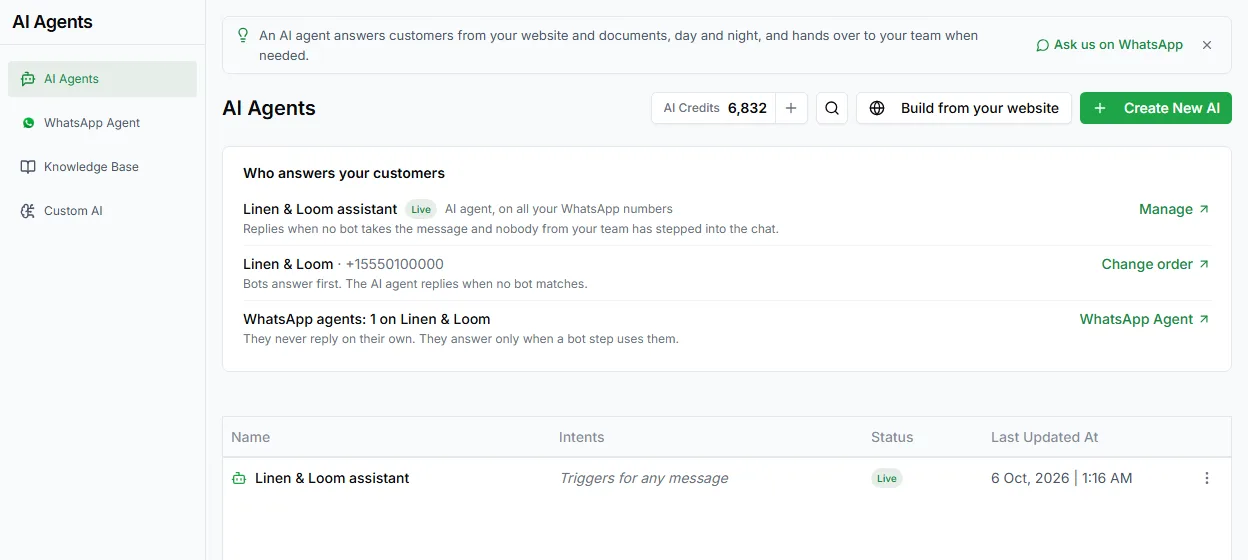
Open Automate → AI Agents in the left sidebar. The same area also has WhatsApp Agent, Knowledge Base and Custom AI.
AI credits
Section titled “AI credits”AI agents use AI credits. Every plan includes a monthly allowance that refills each month. The AI Credits chip on the AI Agents page shows your balance; click + to open Settings → AI Wallet, where you can buy more.
An agent with no credits can’t reply. If a bot’s AI Agent step runs out of credits, the chat is handed to your team instead. Check your balance before you put an agent live.
Create an agent
Section titled “Create an agent”- Open Automate → AI Agents.
- Click + Create New AI.
- Fill in the Create AI Agent form.
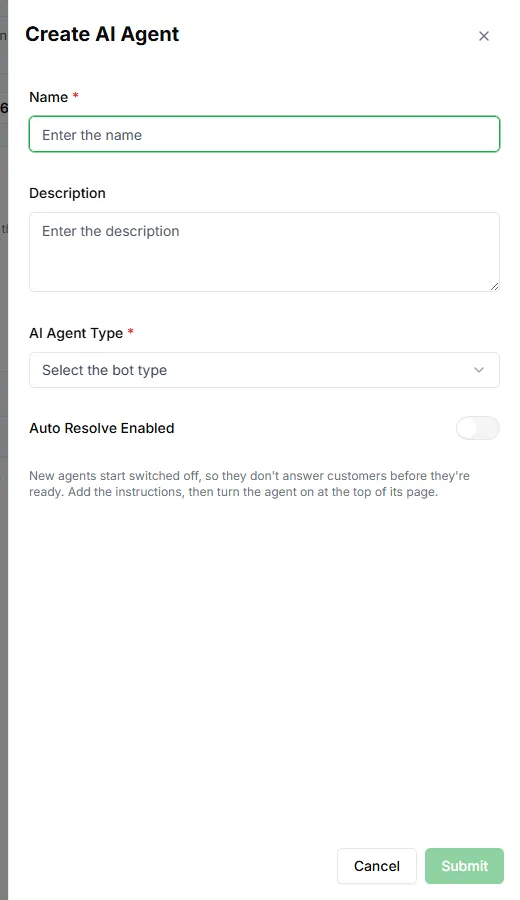
| Field | Notes |
|---|---|
| Name | Required. How the agent appears in your list |
| Description | Optional. What the agent is for |
| AI Agent Type | Required. Choose Message based: it replies to incoming WhatsApp messages. |
| Auto Resolve Enabled | Marks the chat resolved when the agent has finished |
Click Submit. New agents start switched off, so nothing reaches customers until you’re ready.
Put an agent live
Section titled “Put an agent live”- Configure the agent (see Configure an AI agent).
- Click Test and try it with the questions your customers really ask.
- Click Publish, and switch the agent on.
The newest active, published, message-based agent answers on your WhatsApp numbers. Under Custom AI you choose whether bots or the AI agent get the first go at a new message.
WhatsApp Agent agents work differently: they only reply when a bot reaches an AI Agent step.
The agent list
Section titled “The agent list”Each agent shows its Name, Intents, Status (for example Live or Not published) and Last Updated At. Use the ⋮ menu to Edit AI or delete it.
Change an agent
Section titled “Change an agent”You can edit an agent at any time. Changes stay as a draft until you click Publish changes, so customers keep getting the published version while you work.