

More flow steps
The pages in this section cover the steps most bots are built from. This page lists every step in the palette, in the same groups the editor uses.
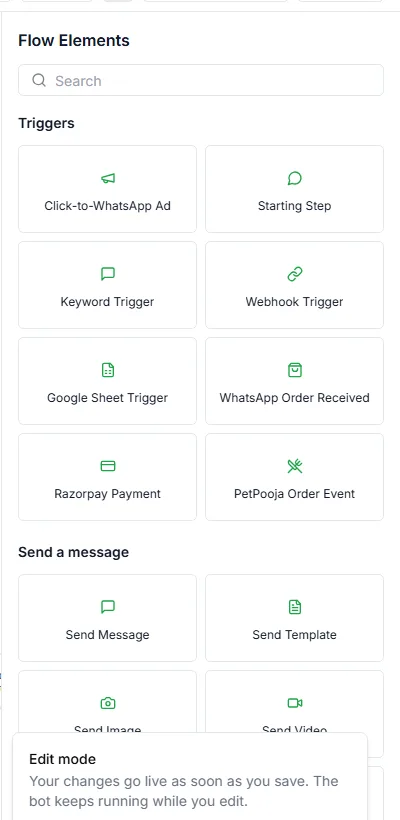
Every step works the same way: add it to the canvas, then double-click it to open its settings.
Triggers
Section titled “Triggers”What starts the bot. Your bot type sets the first one for you.
| Step | Starts the bot when |
|---|---|
| Starting Step / Keyword Trigger | A customer’s message matches your keywords, or any message arrives |
| Webhook Trigger | An outside system calls the bot’s webhook address |
| Google Sheet Trigger | A new row is added to a connected Google Sheet |
| WhatsApp Order Received | A customer orders from your catalogue in chat |
| Razorpay Payment | A Razorpay payment is captured, fails or is refunded |
| PetPooja Order Event | A PetPooja order changes status |
| Click-to-WhatsApp Ad | A customer messages you from one of your ads |
Store events such as order shipped or abandoned cart start Journeys instead.
Send a message
Section titled “Send a message”| Step | What it does | Guide |
|---|---|---|
| Send Message | Text, with up to 3 quick-reply buttons | Send message |
| Send Template | An approved WhatsApp template | Send template |
| Send Image / Video / Audio / Document | A media file with a caption | Send media |
| Send Buttons / Send List | Reply buttons or a pick-from-a-menu list | Send buttons and lists |
| Single Product / Multi Product / Send Collection | Products from your WhatsApp catalogue | Send products |
| Send Location | A map pin | Send location |
| Send CTA URL | A message with one link button | — |
| WhatsApp Flow | A WhatsApp form for the customer to fill in. Build forms under Automate → Forms. | — |
| AI Agent | Lets one of your AI agents answer the customer’s latest message, then carries on | — |
Ask a Question
Section titled “Ask a Question”| Step | What it does | Guide |
|---|---|---|
| User Input | Asks a question and saves the answer | User input |
| Multiple Choice | Sends numbered options the customer replies to | Multiple choice |
| Ask Keyword | Branches on keywords in the reply | Ask keyword |
| Address | Sends WhatsApp’s address form | Address |
| Ask for Location | Asks the customer to share a location pin | Ask for location |
| Ask for a File | Waits for a photo or document | Ask for a file |
| Wait for Order | Pauses until the customer places a catalogue order | — |
Logic & Flow Control
Section titled “Logic & Flow Control”| Step | What it does |
|---|---|
| Condition | Two-way branch, Yes or No. See Condition. |
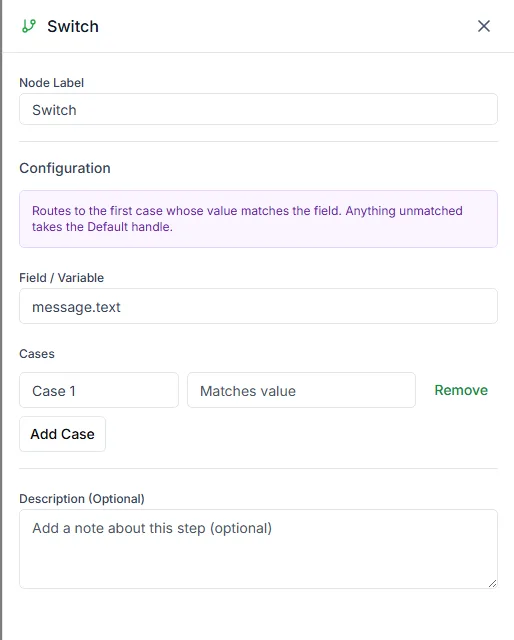
| Switch | Branches on one value, with a case per value and a Default |
| Intent Router | Routes on what the customer means, checking keywords first and then AI |
| Set Variable | Sets a variable for later steps |
| A/B Split | Sends a share of customers down each path, by percentage |
| Loop | Repeats part of the bot a set number of times or over a list |
| Wait | Pauses the bot. See Wait. |
| Wait for Event | Waits for something the customer does, with a time limit |
| End | Ends the bot, with a reason and an optional closing message |
| Call Sub-flow | Runs another bot, then comes back |
| Jump To | Continues from another step |
Integrations
Section titled “Integrations”| Step | What it does |
|---|---|
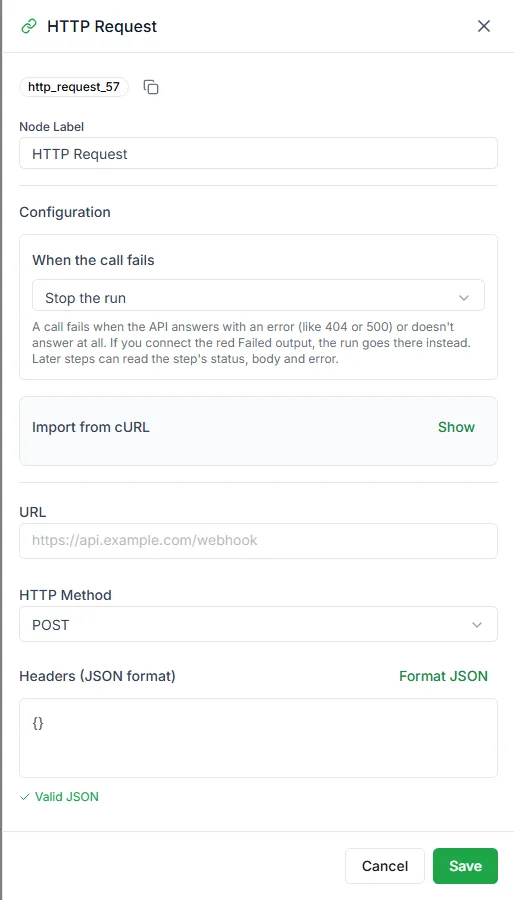
| HTTP Request | Calls an outside API, with Success and Failed outputs. See Connect WhatsApp and Google Sheets. |
| Send Email | Sends an email |
| Collect Payment | Sends a payment request. Needs Razorpay, Cashfree or PayU connected. |
| Generate Invoice | Creates an invoice |
| Get / Add / Update / Delete Sheet Record | Reads and writes a Google Sheet |
| Get Slots, Book Appointment, Get Bookings, Cancel Appointment, Reschedule Appointment | Runs bookings with your Appointments calendar |
| Create / Get / Update / Delete Record | Reads and writes a Data Store (the Data Store tab on the Bots page) |
| PetPooja Menu, PetPooja Collect Order, PetPooja Order | Restaurant ordering through PetPooja |
| Shopify Action / Order to Checkout Link | Works with your connected Shopify store |
Actions
Section titled “Actions”| Step | What it does | Guide |
|---|---|---|
| Set Tag | Adds or removes contact tags | Set tag |
| Set Stage | Moves the contact to a stage in your Pipeline | — |
| Conversation Action | Assigns, unassigns, resolves or reopens the chat, or adds a note | Conversation action |
| Update Contact | Changes contact details, custom fields, tags or marketing opt-in | Update contact |
| Request Intervention | Hands the chat to your team and ends the bot | Request intervention |
| Notify Me (Waitlist) | Signs the customer up for back-in-stock or price-drop alerts | — |
Need help? Email hello@loopchat.inBook a demo · Open LoopChat