

Edit contacts
Edit one contact
Section titled “Edit one contact”On the Contacts page, open a contact’s ⋮ menu and choose Edit, or choose Open Contact to see the contact with their chat history beside it.
You can change the name, phone number, email, company, tags, custom fields and the Campaign Opt-in switch.
The same ⋮ menu also has:
- Message: open a chat with the contact
- Block or Unblock
- Mark inactive or Activate contact. See Deactivate contacts.
Change many contacts at once
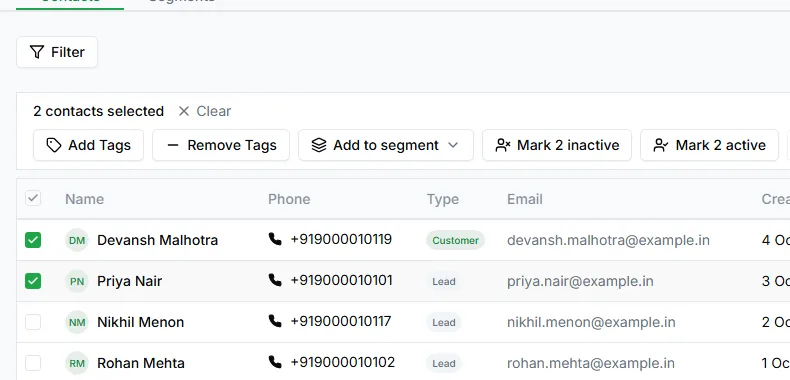
Section titled “Change many contacts at once”Tick the boxes next to the contacts you want, and a bar appears showing how many are selected. From it you can:
- Add Tags to every selected contact
- Remove Tags from every selected contact
- Add to segment: add them to a hand-picked segment
- Mark inactive or Mark active
- Convert to customer: on leads, turn the selected leads into customers
When a contact was last changed
Section titled “When a contact was last changed”Every change updates the contact’s Updated At date, shown on the Contacts page.
Need help? Email hello@loopchat.inBook a demo · Open LoopChat