

Ask keyword
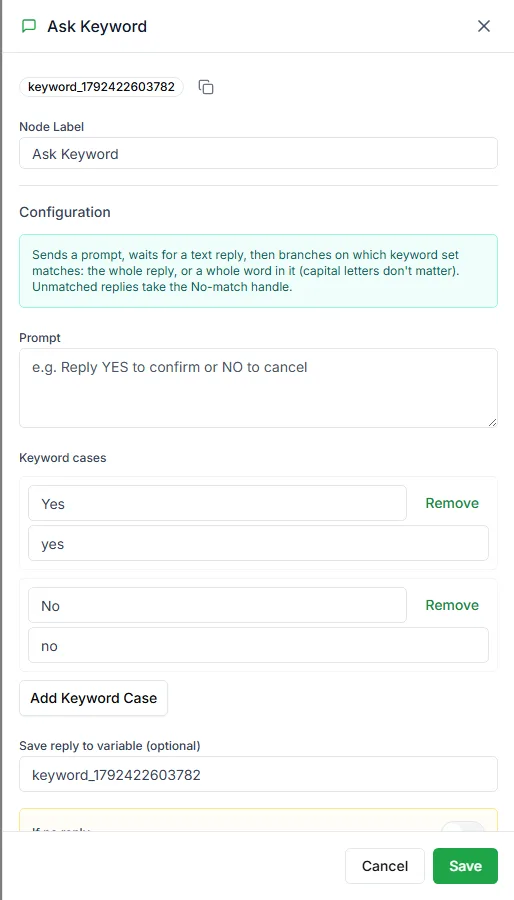
The Ask Keyword step is for when customers type their answer instead of tapping a button. You set up groups of keywords, and the step follows the branch whose keywords match the reply.
Find it in the Ask a Question group of the palette.
Settings
Section titled “Settings”| Setting | Notes |
|---|---|
| Prompt | The question, for example Reply YES to confirm or NO to cancel |
| Keyword cases | One row per branch: a Label and its Keywords |
| Save reply to variable (optional) | Saves exactly what the customer typed |
Each case has:
- Label: the branch name, for example Yes
- Keywords: words that pick this branch, separated by commas, for example
yes, y, ok, confirm
Each case gets its own output on the step.
When nothing matches
Section titled “When nothing matches”The step has a No match output for replies that don’t match any case, and can have a No reply output for customers who don’t answer. Connect No match to something helpful, such as a reworded question or Request intervention.
Which question step to use
Section titled “Which question step to use”| Step | Use it when |
|---|---|
| Ask Keyword | Customers type freely and you branch on words |
| Multiple choice | You offer a fixed, numbered list |
| User input | You want to save and check a value, not branch on it |
Need help? Email hello@loopchat.inBook a demo · Open LoopChat