

Send template
The Send Template step sends one of your WhatsApp templates. Because Meta has already approved the wording, a template can reach a customer even when they haven’t messaged you in the last 24 hours. That’s what makes order updates, reminders and follow-ups possible.
Find it in the Send a message group of the palette.
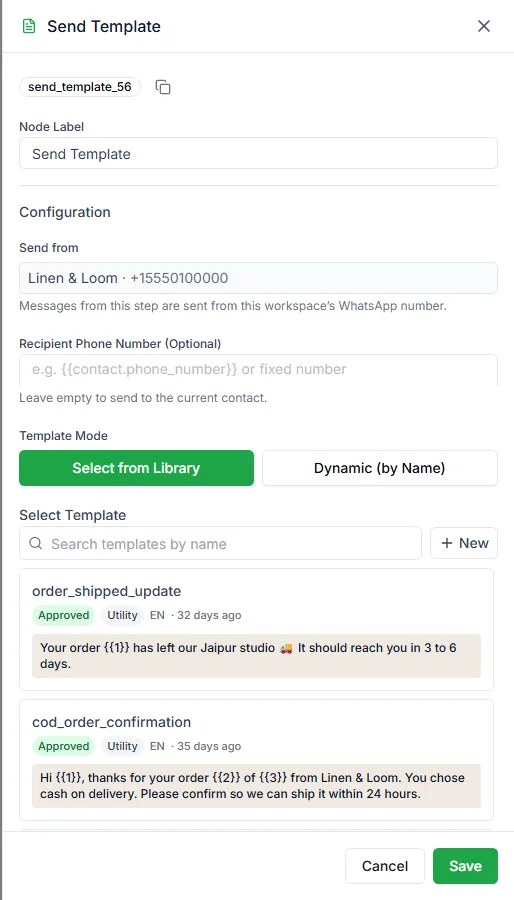
Template mode
Section titled “Template mode”Select from Library
Section titled “Select from Library”Search your templates and pick one from the cards. The step shows the template’s name, language and approval status.
Dynamic (by Name)
Section titled “Dynamic (by Name)”Enter the template name to use when the bot runs. It can be a fixed name or a variable:
order_confirmation{{triggerData.templateName}}This lets one bot send different templates, for example choosing the template from the order status.
Template variables
Section titled “Template variables”If the template has placeholders such as {{1}} and {{2}}, you’ll see a row for each one.
| Field | Notes |
|---|---|
| Value | What to send: fixed text or a variable from the bot |
| Fallback Value (Required) | Sent if the value turns out to be empty |
The fallback is required on purpose: an empty value would leave a hole in the message, or Meta would reject it. Empty fields are flagged with Value is required before you can publish.
Media headers
Section titled “Media headers”If the template has an image, video or document header, upload the file in the step. The preview updates to show it.
Button actions
Section titled “Button actions”When the template has buttons, the Button Actions settings appear:
| Setting | What it does |
|---|---|
| Pause flow until a button is selected | The bot waits here until the customer taps a button |
| Store Selection As | The variable the tapped button is saved in |
| Timeout (seconds) | How long to wait for a tap |
| Require selection | Keep waiting for a button rather than any reply |
Each button also gets its own output, so every choice can lead somewhere different. Templates with link or phone buttons let you change the link or number in Call To Action Inputs, so one template can carry a link made for each customer.
Live preview
Section titled “Live preview”The step shows the template as the customer will see it, with your values filled in. Read it before publishing: a wrong variable is obvious in the preview and easy to miss in the form.
Recipient phone number
Section titled “Recipient phone number”Optional. Leave it empty to send to the customer the bot is talking to.