

Connect your own bot
The Automation tab on Settings → WhatsApp Channel lets you connect your own software to your number. Use it when your logic already lives in your own service, instead of, or alongside, LoopChat’s bots.
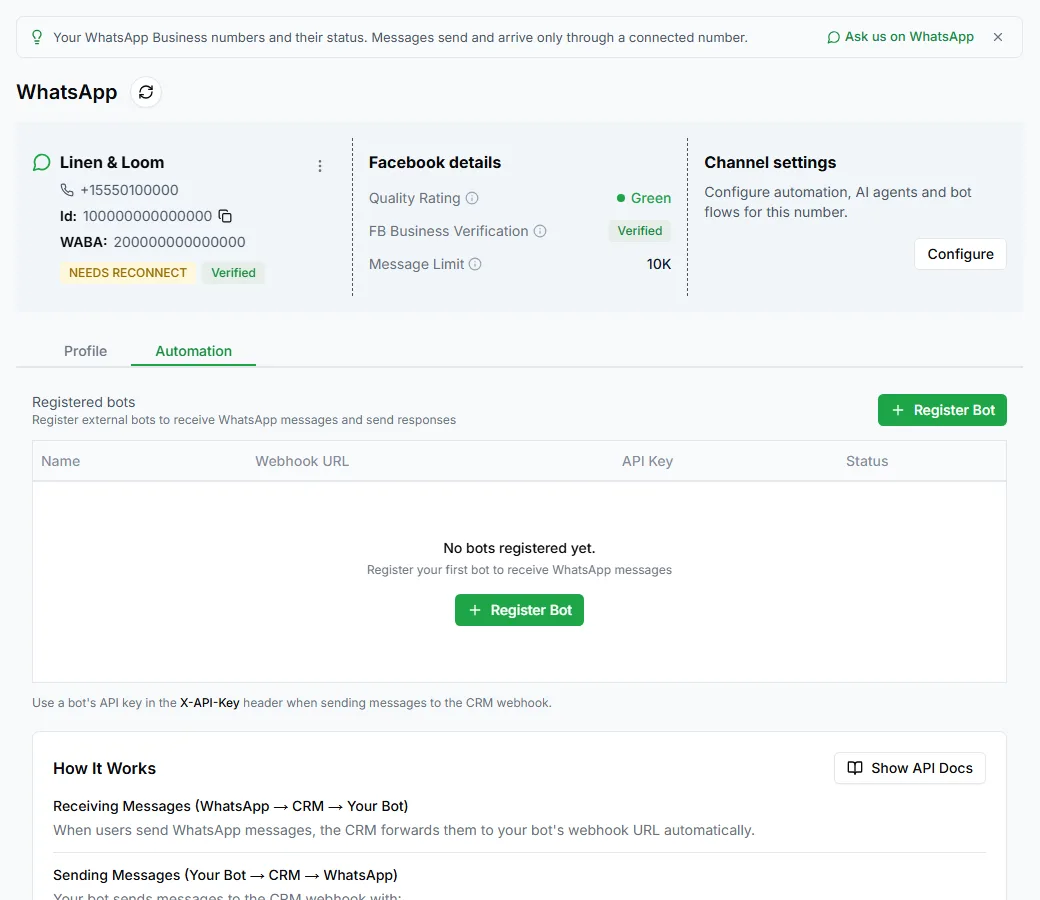
If nothing is connected yet, you’ll see No bots registered yet.
Register a bot
Section titled “Register a bot”Click Register Bot and fill in:
| Field | Notes |
|---|---|
| Bot Name | A name for your reference, for example Order updates bot |
| Direction | Send Only, Receive Only or Send & Receive |
| Webhook URL | Where LoopChat sends incoming messages, for example https://yourbot.example.com/webhook |
| Auto-create contacts | Create contacts for new numbers automatically |
When you register, LoopChat gives the bot an API key.
The API key
Section titled “The API key”Your software sends the key in the X-API-Key header. Without it, requests fail with Missing X-API-Key header. A wrong or switched-off key gets Invalid or inactive API key.
Copy the key when it’s shown and keep it somewhere safe.
Regenerate Key creates a new key and stops the old one working. Use it if a key leaks, and update your software straight away.
Message formats
Section titled “Message formats”Click Show API Docs to see the message formats your bot can send, with examples, including text messages, image messages and messages with buttons, plus a Python example and error codes.
Manage registered bots
Section titled “Manage registered bots”Each bot has an on/off switch, plus Edit and Delete. Switching a bot off pauses its messages but keeps its settings and key, which is handy while you fix a problem.
Follow the advice in the docs: always check the response status before you process a reply. Software that assumes every request worked will lose messages the first time one fails.
LoopChat bots or your own?
Section titled “LoopChat bots or your own?”| Use | When |
|---|---|
| LoopChat bots | You want to build conversations visually, with no code |
| Your own bot | Your logic already lives in your own service |
You can also mix them: a LoopChat bot can call your service with an HTTP Request step. For sending templates from your own code, see the Developer API.