

Export contacts
You can download your contacts as a spreadsheet, for backups, reports or to use in another tool.
Export your contacts
Section titled “Export your contacts”- Open Contacts.
- Use search and Filter to narrow the list, if you only want some contacts.
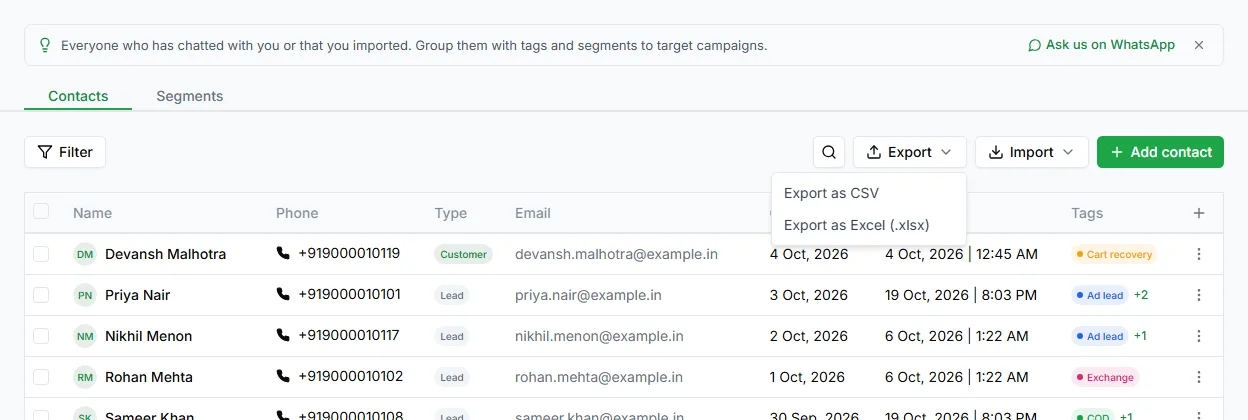
- Click Export and choose Export as CSV or Export as Excel (.xlsx).
LoopChat downloads the file and shows how many contacts were exported.
What’s in the file
Section titled “What’s in the file”| Column | Contains |
|---|---|
| name | The contact’s name |
| phone_number | Their phone number, with country code |
| Their email address | |
| type | Lead or customer |
| status | Active, inactive or blocked |
| tags | Their tags |
| campaign_opted_out | yes if they don’t get campaigns, no if they do |
| notes | Notes on the contact |
| created_at / updated_at | When the contact was added and last changed |
| cf: columns | One column for each of your custom fields, for example cf:city |
Which contacts are included
Section titled “Which contacts are included”The export follows your search, the Type, Status and Tags filters, and your sort order. Store filters from Shopify aren’t applied to the export.
Need help? Email hello@loopchat.inBook a demo · Open LoopChat