

Send media
There’s one step for each kind of media, all in the Send a message group: Send Image, Send Video, Send Audio and Send Document. They work the same way.
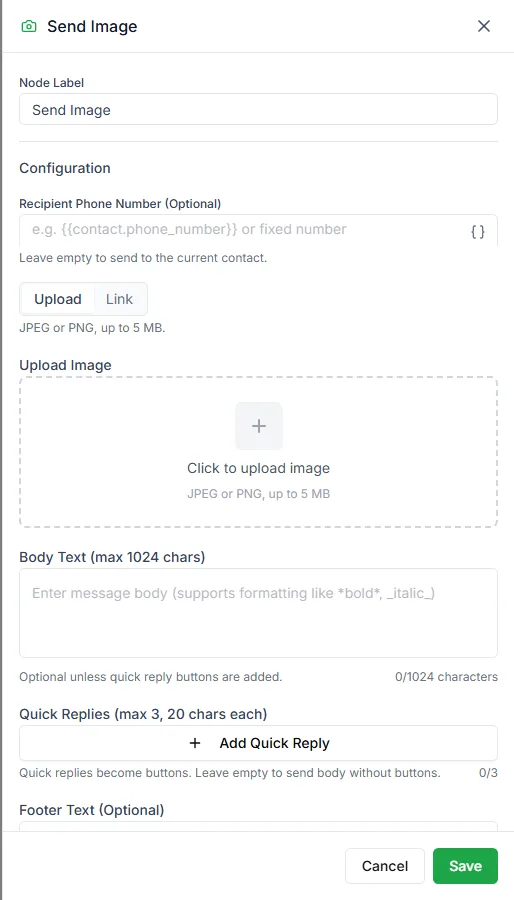
Choose the file
Section titled “Choose the file”Each media step has two tabs:
- Upload: upload the file to LoopChat and send that.
- Link: paste a direct link to a file anyone can open.
Use Link when the file is different for each customer, for example an invoice PDF your own system creates, with the link saved in a variable.
Size and format limits
Section titled “Size and format limits”LoopChat checks the file when you upload it, so a file that’s too big or the wrong type is stopped straight away.
| Step | Formats | Largest file |
|---|---|---|
| Send Image | JPEG, PNG | 5 MB |
| Send Video | MP4, 3GP | 16 MB |
| Send Audio | AAC, AMR, MP3, M4A, OGG | 5 MB |
| Send Document | PDF, Word, Excel, PowerPoint, TXT | 100 MB |
Other settings
Section titled “Other settings”| Setting | Notes |
|---|---|
| Recipient Phone Number | Optional. Leave it empty to send to the customer the bot is talking to. |
| Body Text | A caption, up to 1,024 characters |
| Quick Replies | Optional, up to 3 buttons |
| Footer Text | Optional |
| Enable preview | Images only |
Need help? Email hello@loopchat.inBook a demo · Open LoopChat