

WhatsApp and AI credits
Open Settings → Billing and find the Credits Top-up section. It shows your credit balances, usage and history.
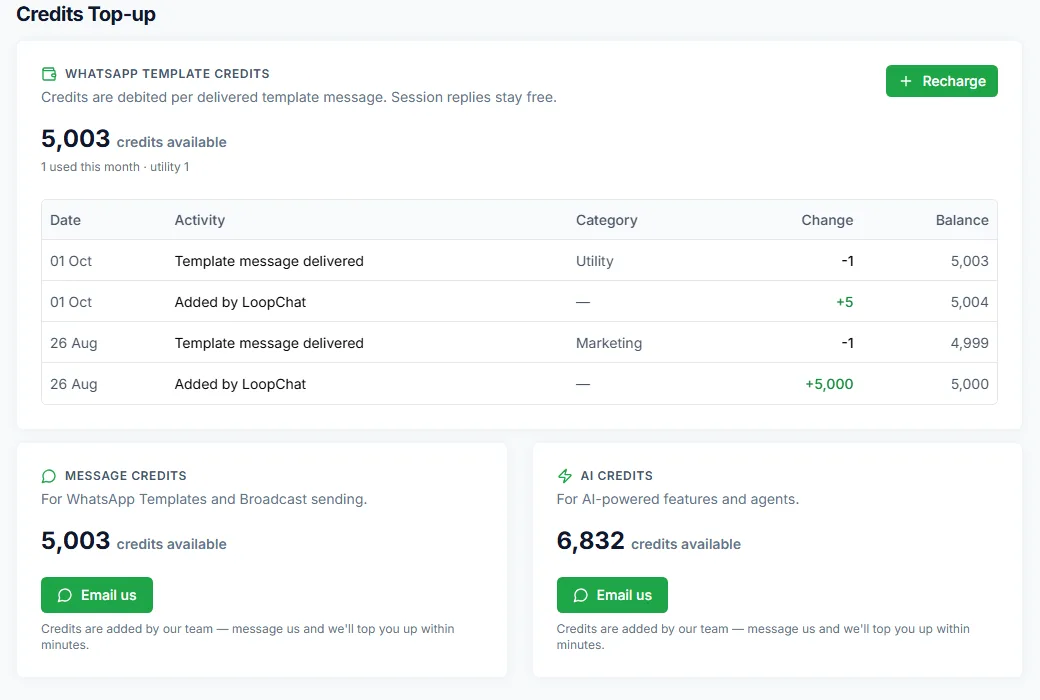
WhatsApp template credits
Section titled “WhatsApp template credits”The WhatsApp Template Credits card shows your credits for template messages.
- One credit covers one delivered template message. A message that fails doesn’t use a credit.
- Replies inside the 24-hour window stay free.
- Credits never expire.
The card shows how many credits are available and how many you’ve used this month.
Where your credits went
Section titled “Where your credits went”Below the card is a history of every change:
| Entry | Meaning |
|---|---|
| Template message delivered | A credit used for a delivered template |
| Recharge | Credits you bought |
| Included with your plan | Credits that come with your plan |
| Added by LoopChat | Credits added by our team |
| Adjustment | A correction to your balance |
Recharge
Section titled “Recharge”- Click Recharge.
- In Add WhatsApp credits, choose a pack.
- Click Pay to go to the payment page.
Credits are added as soon as the payment goes through.
AI credits
Section titled “AI credits”AI credits are used by AI agents and other AI features. Your plan includes a monthly allowance that refills each month. To buy more, go to Settings → AI Wallet and click Buy credits, or click + next to AI Credits on the AI Agents page.
Message credits
Section titled “Message credits”Message Credits shows the credits available for WhatsApp templates and broadcasts. For a manual top-up of message or AI credits, use the Email us button on the card and our team will add them, usually within minutes.
Everything else on the page
Section titled “Everything else on the page”The same page also shows your plan usage, plans, Compare features, Add-Ons and Invoices. If a payment doesn’t start, the page shows the reason; email hello@loopchat.in with it and we’ll help.