

Update contact
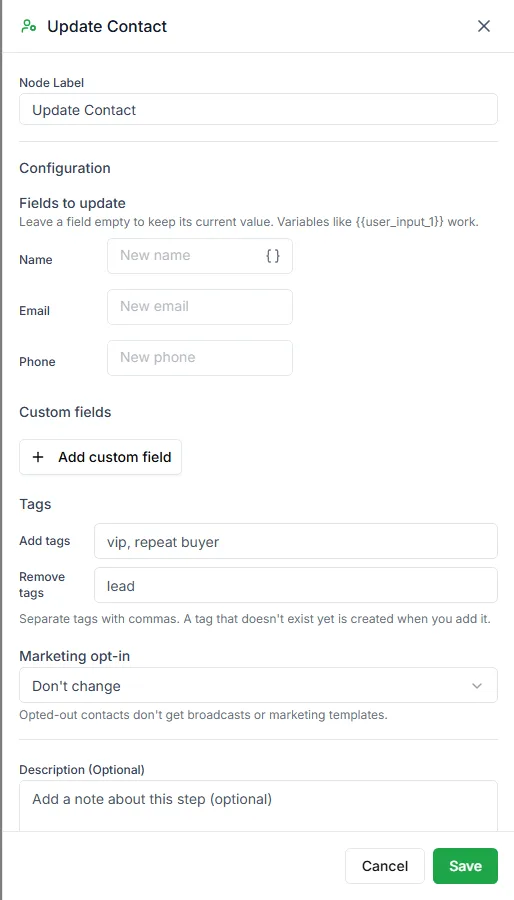
The Update Contact step saves what the bot has learned onto the customer’s contact record, so your team and your campaigns can use it later.
Find it in the Actions group of the palette.
Settings
Section titled “Settings”| Setting | Notes |
|---|---|
| Fields to update | Name, Email and Phone. Leave a field empty to keep its current value. |
| Custom fields | Pairs of Field name and Value, for your own contact fields |
| Tags | Add tags and Remove tags, separated by commas. A tag that doesn’t exist yet is created when you add it. |
| Marketing opt-in | Don’t change, Set to opted in or Set to opted out |
Every value can be fixed text or a variable from earlier in the bot, such as {{user_input_1}}.
Example
Section titled “Example”A lead-capture bot:
- User Input: What’s your email?, saved as
customer_email - Update Contact: Email =
{{customer_email}}, Add tags =lead, website-enquiry - Send Message: Thanks! We’ll email you the price list.
Related steps
Section titled “Related steps”- Set tag only adds or removes tags.
- Conversation action changes the chat, not the contact.
Need help? Email hello@loopchat.inBook a demo · Open LoopChat