

Opt-outs
WhatsApp expects every marketing message to come with a way to stop them. LoopChat handles opt-outs for you.
STOP and START work automatically
Section titled “STOP and START work automatically”When a customer sends a message that is just an opt-out word, such as STOP, UNSUBSCRIBE or OPT OUT, LoopChat:
- Turns their Campaign Opt-in off.
- Sends a confirmation: You won’t get marketing messages from us any more. Reply START if you change your mind.
When they send an opt-in word such as START or SUBSCRIBE, LoopChat turns Campaign Opt-in back on and confirms that too.
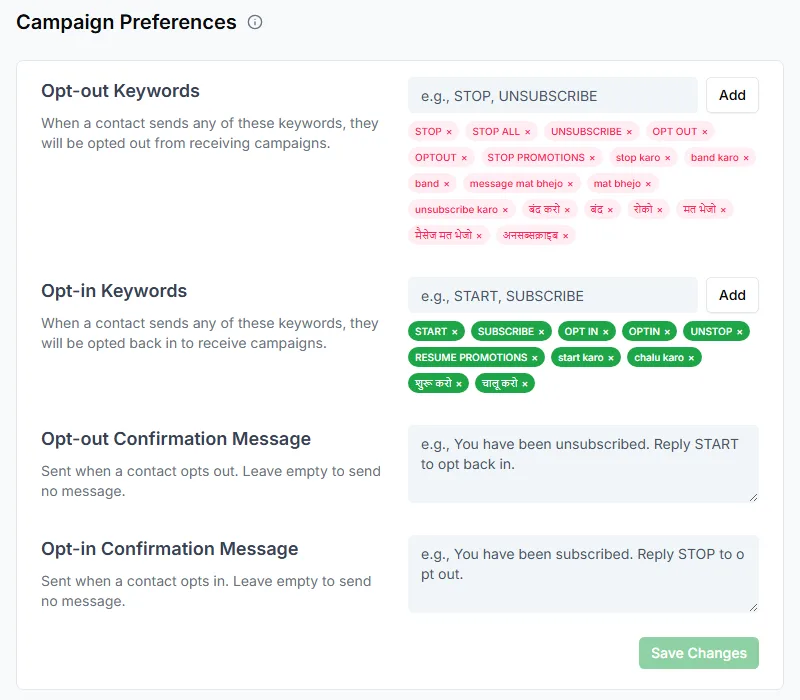
Common Hindi and Hinglish phrases, such as band karo and message mat bhejo, work as well.
Change the keywords
Section titled “Change the keywords”Go to Settings → Campaign Preferences to edit the Opt-out Keywords and Opt-in Keywords for your workspace. You can also write your own Opt-out Confirmation Message and Opt-in Confirmation Message; leave one empty to send no message.
Add an opt-out line to marketing templates
Section titled “Add an opt-out line to marketing templates”When you create a marketing template, LoopChat fills the footer with Reply STOP to unsubscribe. Keep it. A marketing template without a way to opt out is a common reason for a lower quality rating.
Opt someone out yourself
Section titled “Opt someone out yourself”If a customer asks in their own words, such as please stop sending me offers, turn Campaign Opt-in off on their contact. To do many at once, select them on the Contacts page and edit them in bulk. See Edit contacts.
What opted-out customers still get
Section titled “What opted-out customers still get”Turning off Campaign Opt-in stops broadcasts and marketing templates. It doesn’t stop:
- Your replies within an open chat
- Utility messages, such as order confirmations, appointment reminders and delivery updates
A customer who opts out of marketing still expects to hear that their order has shipped.