

Ask for a file
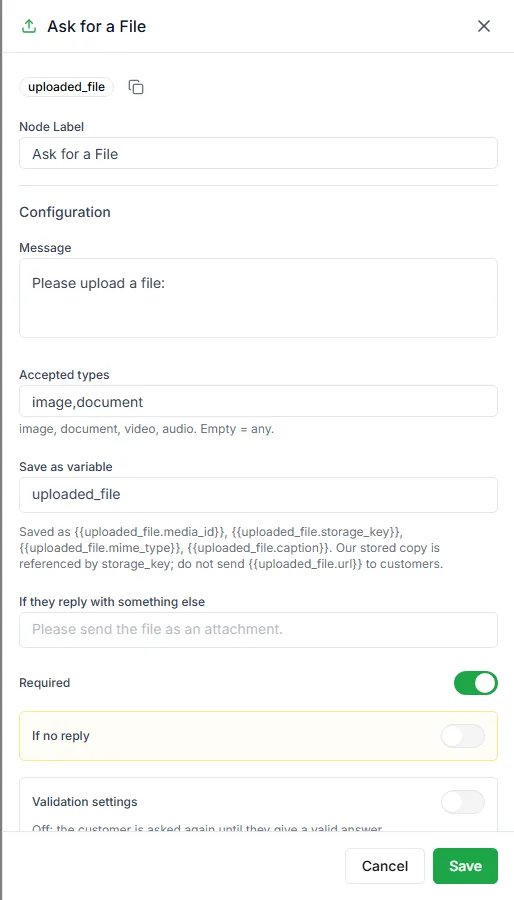
The Ask for a File step asks the customer to send a photo or document and waits until they do.
Find it in the Ask a Question group of the palette.
Settings
Section titled “Settings”| Setting | Notes |
|---|---|
| Message | The request, for example Please send a photo of the damaged item |
| Accepted types | Any of image, document, video, audio, separated by commas. Leave it empty to accept any file. |
| Save as variable | The variable the file is saved in, uploaded_file by default |
| If they reply with something else | What to send when the customer types a message instead of sending a file |
| Required | Keep asking until a file arrives |
Use the file
Section titled “Use the file”Later steps can use the saved file, for example {{uploaded_file.mime_type}} for its type and {{uploaded_file.caption}} for any caption the customer added. For example, pass it to your team with Request intervention so the photo is right there when an agent opens the chat, or send it to your own system with an HTTP Request step.
Common uses
Section titled “Common uses”- Photos of a damaged or wrong item for a return
- A payment screenshot
- An ID or address proof
- A prescription or a document to review
Need help? Email hello@loopchat.inBook a demo · Open LoopChat