

Webhooks
Webhooks send LoopChat events to your own server the moment they happen: a customer messages you, a message is delivered, a template is approved, and so on.
Add a webhook
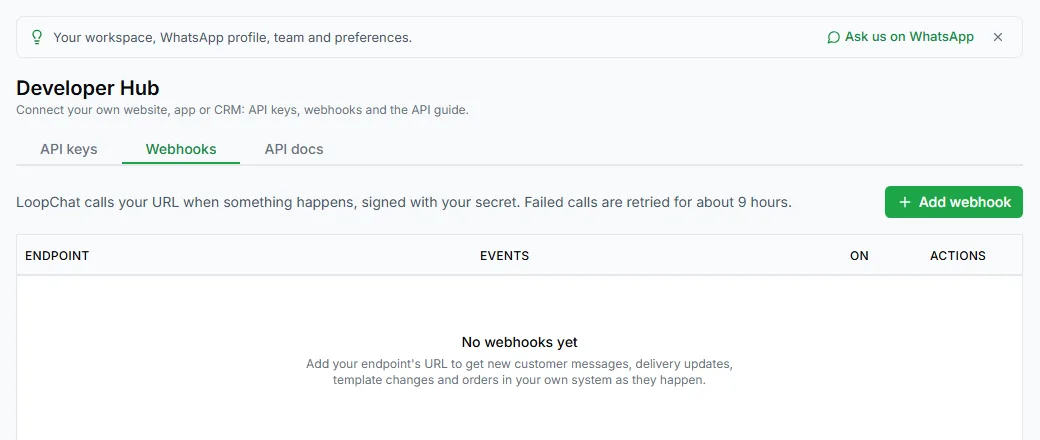
Section titled “Add a webhook”- Go to Settings → Developer Hub, open the Webhooks tab and click Add webhook.
- Enter your Endpoint URL. It must be a public
httporhttpsaddress. - Choose the Events to send.
- Add Notes if you like, then save.
- Copy the signing secret. It’s only shown once.
You can add up to 10 webhooks per workspace.
Events
Section titled “Events”| Event | Sent when | What’s in data |
|---|---|---|
message.received |
A customer sends you a WhatsApp message | message_id, from, contact_name, type, text, conversation_id, new_conversation |
message.status |
A message you sent is sent, delivered, read or fails | message_id, status, recipient, timestamp, errors |
template.status |
Meta approves, rejects or pauses one of your templates | template_id, template_name, language, status, reason |
template.category |
Meta moves one of your templates to another category | template_id, template_name, previous_category, new_category, campaigns_paused, campaigns_resumed |
order.received |
An order comes in through the Orders API | order_id, result, events |
ping |
You click Send a test event | message |
What LoopChat sends
Section titled “What LoopChat sends”Each event is a POST with a JSON body:
{ "id": "6f1d2c3a-8b4e-4f5a-9c7d-2e1b0a9f8c7d", "topic": "message.received", "created_at": "2026-10-19T10:15:00.000Z", "business_account_id": "...", "data": { "message_id": "wamid...", "from": "+919000000000", "contact_name": "Asha", "type": "text", "text": "Is cash on delivery available?", "conversation_id": "...", "new_conversation": true }}With these headers:
| Header | Contains |
|---|---|
X-LoopChat-Event |
The event name |
X-LoopChat-Delivery |
An ID for this delivery. It stays the same on retries, so use it to ignore repeats. |
X-LoopChat-Signature |
t=<unix time>,v1=<signature> |
User-Agent |
LoopChat-Webhooks/1 |
Check the signature
Section titled “Check the signature”Every event is signed with your webhook’s signing secret, so you can be sure it came from LoopChat.
- Read
tandv1from theX-LoopChat-Signatureheader. - Join
t, a full stop and the raw request body:<t>.<raw body>. - Work out the HMAC-SHA256 of that text with your signing secret, as hex.
- Compare it with
v1using a constant-time comparison. - Reject the event if
tis more than 5 minutes from your server’s clock.
import crypto from 'node:crypto';
function isFromLoopChat(rawBody, header, secret) {  const parts = Object.fromEntries(header.split(',').map((p) => p.split('=')));  const expected = crypto.createHmac('sha256', secret).update(`${parts.t}.${rawBody}`).digest('hex');  const fresh = Math.abs(Date.now() / 1000 - Number(parts.t)) < 300;  const a = Buffer.from(expected);  const b = Buffer.from(parts.v1 || '');  return fresh && a.length === b.length && crypto.timingSafeEqual(a, b);}
Use the raw body exactly as received. If your framework turns it into an object and back, the signature won’t match.
Delivery and retries
Section titled “Delivery and retries”- Reply with any
2xxstatus within 5 seconds and the event counts as delivered. - Otherwise LoopChat tries again after 1 minute, 5 minutes, 30 minutes, 2 hours and 6 hours, then marks the delivery as failed.
- LoopChat doesn’t follow redirects, so give the final address.
Manage webhooks
Section titled “Manage webhooks”Each webhook in the Developer Hub has:
- Send a test event: sends a
pingstraight away and shows the answer - Delivery log: recent deliveries with the time, event, result, your server’s answer, number of tries and any problem
- Edit: change the address, events or notes, or switch the webhook off
- Replace signing secret: makes a new secret, shown once. The old one stops working straight away.
- Remove
Changes to the events a webhook gets take effect within about a minute.
Need help? Email hello@loopchat.inBook a demo · Open LoopChat