

Deactivate contacts
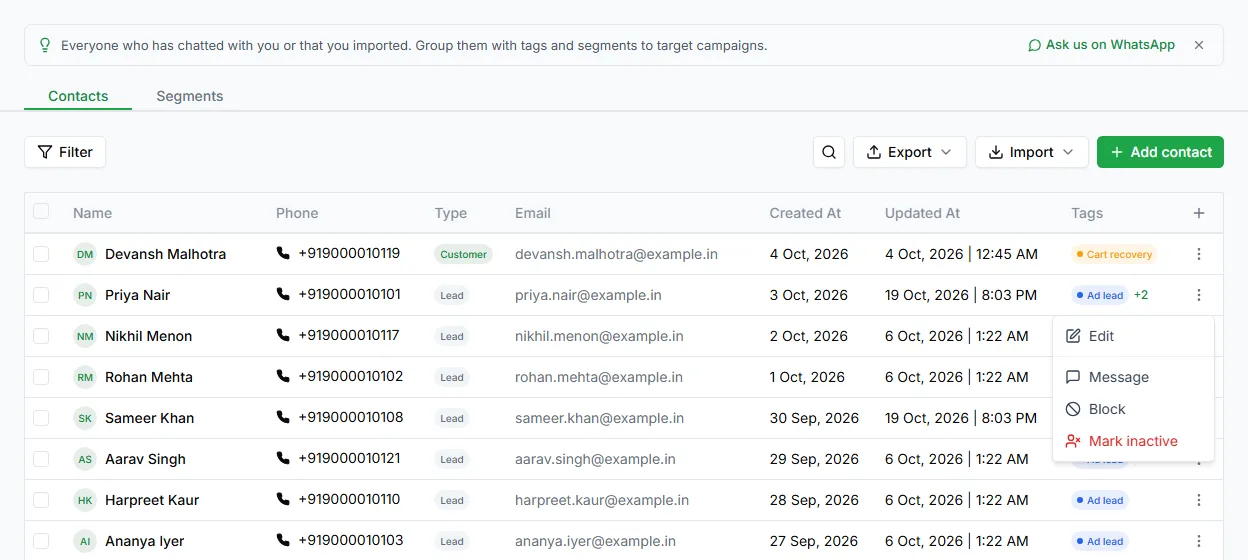
When a contact should stop getting your campaigns, mark them inactive. LoopChat keeps the contact: inactive is a status you can change back, not a deletion.
That matters in practice: a customer who asks to be left alone and comes back six months later still arrives with their history.
Deactivate one contact
Section titled “Deactivate one contact”On the Contacts page, open the contact’s ⋮ menu and choose Mark inactive. Confirm in the Mark contact as inactive window by clicking Mark inactive.
Deactivate many contacts
Section titled “Deactivate many contacts”Tick the contacts you want, then click Mark N inactive in the bar that appears and confirm in the Mark contacts as inactive window.
To retire a whole group, filter first (see Find and filter contacts), click Select all N matching, then mark them inactive together.
Make a contact active again
Section titled “Make a contact active again”Open the contact’s ⋮ menu and choose Activate contact, then click Mark active. They can get campaigns again straight away. To reactivate several at once, select them and click Mark N active.
Can I delete a contact?
Section titled “Can I delete a contact?”There’s no delete button for contacts in LoopChat. We keep contact records so your chat history and reports stay complete. Marking a contact inactive is how you stop all campaigns to them.
If a customer asks you to erase their data, email hello@loopchat.in and we’ll help.
In the inbox, Delete chat only removes a chat from your inbox view. The messages and the contact are kept, and the chat comes back if the customer messages you again.