

Connect WhatsApp
You connect a number inside Meta’s own window, opened from LoopChat. LoopChat never asks for your Facebook password: you sign in with Meta directly, and Meta only shares the accounts you approve.
Where to start
Section titled “Where to start”Your first number: after you sign up, click Connect WhatsApp on the home page.
More numbers: go to Settings → WhatsApp Channel, open the ⋮ menu on your number’s card and choose Add Account. If you have no numbers yet, the page shows Add Your First Account.
Connection steps
Section titled “Connection steps”Step 1: Choose your business accounts
Section titled “Step 1: Choose your business accounts”Meta asks which accounts LoopChat may use. Pick ones you already have, or create new ones without leaving the window:
- Business portfolio: choose your existing portfolio, or create one.
- WhatsApp Business Account: choose an existing one, or create a new one.
Step 2: Add your business details
Section titled “Step 2: Add your business details”If you’re creating a new WhatsApp Business Account, fill in your business details.
Step 3: Set up your WhatsApp profile
Section titled “Step 3: Set up your WhatsApp profile”Enter the details customers see when they open your business profile in WhatsApp. You can change them later from the Profile tab. See Business profile and number status.
Step 4: Add and verify your number
Section titled “Step 4: Add and verify your number”- Enter the number you want to connect.
- Enter the code Meta sends to it by text message or call.
Step 5: Wait while it’s set up
Section titled “Step 5: Wait while it’s set up”Meta takes a few minutes to set up the account. LoopChat then registers your number and starts receiving its messages. The window closes by itself when it’s done.
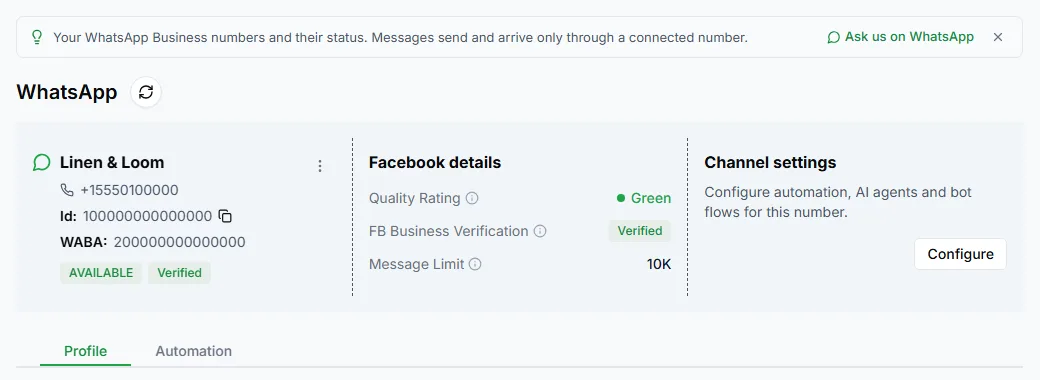
Step 6: Check the WhatsApp Channel page
Section titled “Step 6: Check the WhatsApp Channel page”In LoopChat, your number appears on Settings → WhatsApp Channel as a card with the business name, phone number, the number’s Id, the WABA id and its status. A green Verified label appears once Meta has verified your business.
Your number is connected. Open Chat to see conversations arrive, or Bots to start automating replies.